Friday, October 17, 2008

Conversion Factors

Let's face it: not all restaurant recipes were conceived at the volume that is needed in a professional kitchen. In fact, most recipes were initially developed for a much smaller group of people, and then adapted for large-scale use. Converting these recipes isn't difficult, and it gets easier with a little knowledge of conversion factors.


To find the conversion factor (CF) of a recipe, you need two factors: the amount that the recipe currently yields, and the amount that you need it to yield. For instance, let's say you have a recipe that yields 6 servings, and you need to feed 50 people. 50 divided by 6 is 8.333, so you have a CF of 8. If you needed to go the other way, you would have 6 divided by 50, which is 0.12.

But that's only part of the process. Let's look at the ingredient list on my oatmeal cookie recipe:

1 cup butter
1/2 cup white sugar
1 cup brown sugar
2 eggs
1 1/2 tsp vanilla extract
1 cup all-purpose flour
1 tsp baking soda
1 tsp salt
1 1/2 tsp cinnamon
3 cups oats
1 cup raisins

This recipe yields 38 cookies. Let's say I want to convert it to a nice round number, like 250. This gives us a conversion factor of 6.578947368. You can round it if you want. In fact, a lot of bakers would look at this number on the calculator and just call it 6.5, which is probably okay, as long as you use the same CF for each ingredient. In a computer program, you might want to hang onto the unrounded number. For now, I'm going to stick with 6.5.

Your next task is to convert each individual ingredient. This is easy. Multiply the old amount by the conversion factor to get the new amount.


The problem with this is that converting some amounts is non-trivial. 1 1/2 tsp times 6.5 = 9 3/4 tsp. What the heck do you do with that? It gets even more fun when you do it with a lot of commercial software. First, the software requires you to enter decimal values, not fractions like we're used to seeing in recipes. 1.5 X 6.578947368 = 9.868421053. Yeah, good luck with that. Does it help to know that 9 3/4 tsp = 3 Tbsp + 3/4 tsp? It would have been nice if the computer gave us something like that.

Here's the best thing to do: convert each amount to ounces first, apply the CF, and then convert back to the most reasonable value. This is nice, since we have an ounce measurement in both weight- and volume-based recipes. Of course, if you just used metric, this would already be tons easier, but that's just not as common in America as we might like it to be. Let's go ahead and do the whole ingredient list:

Ingredientsold amount
(imperial)
old amount
(ounces)
 CF new amount
(ounces)
new amount
(imperial)
butter1 cup8 fl ozX6.5=52 fl oz6 1/2 cups
white sugar1/2 cup4 fl ozX6.5=26 fl oz3 1/4 cups
brown sugar1 cup8 fl ozX6.5=52 fl oz6 1/2 cups
eggs2 ea2 eaX6.5=13 ea13 ea
vanilla1 1/2 tsp0.25 fl ozX6.5=1.625 fl oz3 Tbsp + 3/4 tsp
ap flour1 cup8 fl ozX6.5=52 fl oz6 1/2 cups
baking soda1 tsp0.1667 fl ozX6.5=1.08333 fl oz2 Tbsp + 1/2 tsp
salt1 tsp0.1667 fl ozX6.5=1.08333 fl oz2 Tbsp + 1/2 tsp
cinnamon1 1/2 tsp0.25 fl ozX6.5=1.625 fl oz3 Tbsp + 3/4 tsp
oats3 cups24 fl ozX6.5=156 fl oz1 gallon + 3 1/2 cups
raisins1 cup8 fl ozX6.5=52 fl oz6 1/2 cups

Well, if you ever need to scale that recipe to make 250ish cookies, I've just done the work for you. But some of you are out there looking at the decimal points, wondering how the heck I got "1/2 tsp" out of 0.08333 fl oz. Some of you are also wondering why I said "fl oz" instead of just "oz".

First, let's talk about ounces. We have two types, ounces by weight (a.k.a. dry ounces or oz/wt) and ounces by volume (a.k.a. fluid ounces or fl oz). As far as water is concerned, there are 16 oz by weight in a pound and 16 fl oz in a pint. You've heard the saying, "a pint's a pound the whole world round", right? Well, it's not entirely true. First of all, the saying is only in reference to water. A pint of flour will not weigh a pound. Interestingly, a pint of butter will weight a pound. Secondly, it's also slightly inaccurate. A pint of water actually weighs approximately 16.7 oz. Even worse, the weight of the pint of water will vary even more, depending on its temperature. At commercial volumes the difference is certainly enough to matter, but for home use it's not usually a big deal.

Let's talk about the 0.08333 fl oz thing. I could just tell you that it's 1/2 tsp and hope you believe me, but I'd like you to know why it's 1/2 tsp. First, let's look at our standard volume conversion chart.

1 gallon = 4 quarts
1 quart = 2 pints
1 pint = 2 cups
1 cup = 8 fl oz
1 fl oz = 2 Tbsp
1 Tbsp = 3 tsp
1 pinch = approx 1/8 tsp (usually non-liquid)
1 dash = approx 1/8 tsp (usually liquid)

That tells us that there are about 16 pinches in a Tablespoon and 32 pinches in a fluid ounce. If we were to convert our standard measurement chart to decimal, and use only ounce conversions, here's what we'd get:

1 gallon = 128 fl oz
1 quart = 32 fl oz
1 pint = 16 fl oz
1 cup = 8 fl oz
1 Tbsp = 0.5 fl oz
1/2 Tbsp = 0.25 fl oz
1 tsp = 0.16667 fl oz
1/2 tsp = 0.08333 fl oz
1/4 tsp = 0.0416667 fl oz
1 pinch/dash = 0.0208333 fl oz

This actually gives us a pretty good baseline for writing recipe software. The user tells the program how much a recipe currently yields and how much they want it to yield. The program converts the entire recipe to ounces, performs the CF calculations, and then converts it back to the closest measurement.

Even if you're not planning on writing recipe software, the above chart is still handy. I know I would be lost in the kitchen without a calculator, but the calculator is still going to give me decimals. Why not print out the chart above and keep a copy with your kitchen calculator? That will save you a little bit of time when scaling your recipes.

Monday, October 13, 2008

Baking Percentages

In the professional bakeshop, recipes are often referred to as formulas. This makes sense if you've ever heard that baking requires exact adherence to the recipe, as any deviation may cause catastrophe. As it turns out, there is another reasons. Many professional bakeries will use a system of baking percentages, which is actually pretty straight-forward and extremely useful.

First of all, you need to remember that bakeries like to do everything by weight. This creates for a much more accurate product, since there are so many deviations with volume. A cup of flour will weigh differently, depending on whether the flour was sifted into the cup, scooped into the cup, packed into the cup, etc. But a pound of flour is always a pound of flour.

Speaking of flour, since it is the most common ingredient in a bakery, it is also the baseline of a baking formula. Each ingredient is given a percentage value. These percentages don't all add up to 100%. In fact, one ingredient will always be equal to 100%. If flour is present, then it is 100%. If there are multiple types of flour, the total weight of all flour is 100%. The percentage of the other ingredients is based on their weight compared to the flour:


The following list of ingredients:

8 oz/wt butter
16 oz/wt flour
20 oz/wt water

...would result in the following formula:

50% butter
100% flour
125% water

...because there is half as much butter as flour, and 25% more water than flour. If you had five pounds of flour, the formula would look like this:

2 lbs 8 oz butter
5 lbs flour
6 lbs 4 oz water

This makes it easy to scale recipes to any yield. Of course, as soon as you start adding anything to the formular that isn't weight-based (like number of eggs, or teaspoons of vanilla extract), the complexity goes up. Fortunately, any ingredient can be weighed, so it's easy to convert a recipe to a baking formula.

One more note: if any ingredient other than flour is used as the baseline (such as when flour isn't present in the recipe), it should be noted at the top of the recipe which ingredient is now 100%.

Saturday, October 11, 2008

Composite Recipe: Oatmeal Cookies

Somebody asked me once at a cooking demo how I come up with my recipes. A lot of them are what I call composite recipes. I collect a few recipes that are close to what I want, and then contrast and compare. What I'm looking for is an implementation recipe: a basic, no-frills version of the dish that can be tweaked to my liking.

This is one such recipe. I don't know why I decided upon oatmeal cookies. They're not my favorite type of cookies, not by a longshot. But I do like them. And I like oatmeal. And I like dried cranberries, which I planned to use instead of raisins. So it worked out that I made oatmeal craisin cookies. First, the recipes:
Ingredients Recipe 1 Recipe 2 Recipe 3 Recipe 4 Recipe 5 Me
oven temp 375 F 350 F 350 F 350 F 350 F 350 F
bake time 8 - 10
minutes
11 - 13
minutes
10 - 12
minutes
12 - 15
minutes
10
minutes
12
minutes
butter 1 cup   ½ cup ¾ cup   1 cup
butter flavored
shortening
    ½ cup      
shortening   ¾ cup     1 cup  
white sugar 1 cup ½ cup ½ cup   1 cup ½ cup
brown sugar 1 cup 1 cup 1 cup 1 cup 1 cup 1 cup
eggs 2 ea 1 ea 2 ea 1 ea 2 ea 2 ea
water   ¼ cup        
vanilla 1 tsp 1 tsp 1 tsp 1 tsp 1 Tbsp 1 ½ tsp
ap flour 2 cups 1 cup 1 ½ cups ¾ cup 1 ½ cups 1 cup
baking soda 1 tsp ½ tsp 1 tsp ½ tsp 1 tsp 1 tsp
salt 1 tsp 1 tsp ½ tsp ½ tsp 1 tsp 1 tsp
cinnamon 1 ½ tsp   1 tsp ½ tsp 1 Tbsp 1 ½ tsp
oats 3 cups 3 cups 3 cups 3 cups 3 cups 3 cups
ground cloves     ½ tsp      
raisins     1 cup 1 cup 1 cup 1 cup
chopped nuts       1 cup ¾ cups  

What was interesting was the second recipe, which turned out to be from Quaker Oatmeal. Talk about a pure, unadulterated implementation recipe. Unfortunately, it also looks to taste somewhat horrid. Rather than real butter, they went with shortening and water. Because that didn't rob the recipe of enough flavor, they only used a single chicken egg and completely left out the cinnamon. Still, very tweakable. Part of me is pretty impressed. It's almost like it came out of a laboratory, with almost as much flavor.

There were interesting similarities between the recipes. All of them contained 3 cups of oats. I thought that was a good baseline, so I went with it. Each also contained 1 cup of light brown sugar. That was where the similarities started to diminish.

The recipes which included raisins all called for 1 cup. All but one recipe used 1 teaspoon of vanilla extract. One used a full Tablespoon. Each recipe used either one or two eggs. Baking soda and salt both ranged between 1/2 and 1 teaspoon. Flour varied wildly, as did white sugar. Some preferred butter, some shortening, some a mix. One person decided that the addition of cloves made their recipe "spicy". A couple of people decided to add nuts.

Lastly, oven temp was 350F for everything except for Recipe 1, at 375F. Not surprisingly, the cooking time dropped on that recipe too. Everything else seemed to like being in the 10 to 12 minute range.

I completely ignored the directions on every recipe. I knew I was going to use the creaming method. At the time of this writing, I still have not looked at anything on the recipes other than ingredients, oven temps and cooking times.

You can see my recipe on the side. Obviously, shortening was out of the question; I went with unsalted butter. I completely guessed on the flour. There was nothing scientific or mathematical about it. I went with a lower amount of white sugar because I didn't want the cookies to be too sweet. That's also why I went with a full teaspoon of salt. Instead of light brown sugar, I used dark. I think I got the perfect balance. My wife didn't taste the salt, but I caught just hints of it. As far as sweetness, it wasn't too much or too little. Just right.

My measurement of cinnamon was a compromise. It seemed like a good mid-point. I didn't end up really tasting it, but my wife did. My vanilla measurement was a bit of a mistake; I poured it into the measuring spoon right over the bowl, trying to get just 1 teaspoon. At least another 1/2 teaspoon made it in. Honestly, I wouldn't lower it at all. It was good.

I thought that only one egg was going to add way too little moisture, so I went with two. The cookies had a lot of spread, which I'm going to blame on that. In the future I might drop it down to one egg plus one egg yolk, but the spread with two whole eggs wasn't objectionable at all.

Like I said, I used craisins instead of raisins. I also decided not to add nuts. They have no place in such a cookie, at least not in my kitchen. If you want 'em, go for it.

350F looked good to me, so I went with it. Each of my batches baked for exactly 12 minutes and came out perfect, at least to my liking. I let them get a little dark, but not burnt. Just nicely caramelized. If you're like my friend Delanie who seems to be afraid of burning anything, drop down to 11 minutes and you'll be okay.

All in all, it ended up a really good recipe. If I made it exactly the same way over and over again, I don't think I'd be disappointed. Really, it was a lucky first attempt. But I think you kind of get the idea now what goes into one of my composite recipes.

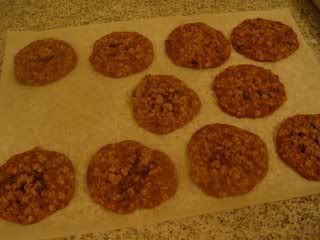
Um. Yeah. I, uh. Had to do some QA on the cookies. It might have been before I thought to take a picture. You know how it goes. This recipe yielded 38 cookies scooped with a #40 disher.

Tuesday, October 7, 2008

Arbitrary Rules

I read an interesting post today on my sister-in-law's blog. The post, which contained a list of 100 books, is designed to be a meme. You mark which books you've read, which ones you haven't read, which ones you loved and which ones you hated or intend never to read.

With a list like this, one might expect to see several "classics". And sure enough, the first book on the list was Pride and Prejudice by Jane Austen. There are few Americans that have not heard of this book, and your knee-jerk reaction was probably one of the two: delight if you are female or some kind of groan if you are male. Being male and having attempted to read this "classic" once, I fall squarely into the "groan of pain" camp. But that's not my point.

Book 2 is The Lord of the Rings by JRR Tolkien. This also falls into the "if you have never heard of this book, it is because you live under a rock" camp. The list goes on and on, inluding The Harry Potty Series by JK Rowling (like The Lord of the Rings, it is no longer classified as a single book, apparently), The Chronicles of Narnia (seven more books just became one), The Lion, The Witch and the Wardrobe (didn't we just cover that one?), Brave New World, Moby Dick, Oliver Twist, you name it. One of my favorites was On The Road by Jack Kerouac. Hailed by The New York Times as "the most beautifully executed, the clearest and most important utterance" of Kerouac's generation, Truman Capote dismissed it by saying, "That's not writing, that's typing."

Hey, how did Harry Potty make it to the list, anyway? The Da Vinci Code? Don't get me wrong, I liked those too. But aren't those a little recent to be on the list? Why are they on the list? Because whoever made the list liked them, and they included them. And now that the list is on the move, making its way from blog to blog, somebody (notably the people that post it) will start to see it as an authority.

Where does this kind of authority come from? Easy. Somebody said something and we believed them. Why does red wine go better with red meat, and white wine goes better with fish and poultry? Because somebody that we thought knew a lot about wine said so, and we believed them. It turns out there are red wines that go well with fish and chicken, and there are white wines that go well with red meat. How do we remember what goes with what? Those are a lot of rules to remember. Let's ask somebody smart for a simple answer, and just go with that.

My sister was on a bus once that was testing a new TV system. They would post various anouncements on the screens to help riders stay informed. When they ran out of important things to say, they literally started making things up. Her example: "For a healthy alternative to soda, try drinking diet soda." WTF, mate? Article after article has been published about the health risks of diet soda. Then again, why do we believe those articles? Because somebody smart-sounding wrote them, or we believe that the person who wrote them got their facts from somebody smart.

There are a lot of good books on the list. There is also a lot of crap on that list. Which ones are crap depends on who you are. As a (straight) male, I am wired to consider anything by Jane Austen a waste of time. Then again, I get my kicks out of reading books with titles like Mastering Regular Expressions and Perl Best Practices. Again, that's how I'm wired. If you're wired differently than me (and for the love of all that is good and holy, I hope that you are not) then my literary opinions should be of little, if any concern to you. And my own personal opinions on anything should never be taken as gospel or any other sort of authority, unless you're looking to buy me a Christmas present or something.

All that I'm saying is, maybe we should stop believing things just because somebody that appeared smart said it. Maybe we should look into things ourselves. And maybe we should stop considering ourselves "educated" just because we read some book that some guy (or girl) wrote. And most importantly, we need to stop giving people authority just because they said they had authority. The only reason some people have authority is because they got people to believe that they do.

Okay, enough of my anarchistic rantings. As you were.

Monday, September 29, 2008

Weighted Keywords

I was thinking back today to an old company that I used to work for. As far as I know, the company went under a while ago, and even if they were still around, it was a long time ago and I never signed any non-disclosure or non-compete agreements, so I'm thinking there's no harm in talking about one of the concepts behind the product that they offered. Maybe somebody will have some use for them.

The idea was simple: a family-safe Internet filter. It wasn't just supposed to handle pornography. It had several other categories that it looked at, including gambling, shopping, games, hate and violence, even lingerie and the like. It would filter sites based on a black list (sites that we knew always matched a category), a white list (sites that we knew would never match a category) and sites that scored high enough using a weighted keyword list.

The black and white lists have always been common in blocking software. If a site is on a black list, it's bad, end of story. If it's on the white list, it's safe to look at. The weighted keywords were really what was important. A team of people looked at various sites that they knew to be bad (or in our case, match a certain category) and found keywords that were more likely to indicate if a site matched a category.

Seeing an opportunity to automate the process, I wrote a script that would Google for a specific query (related to a specific category), hit the first 100 pages that were returned, and count the number of keywords that appeared across all of those pages. It wasn't long before I even created a list of "commonly-used words" that were pretty much useless to count ("the", "of", "and", etc). I saved the results in a series of text files, including both the keyword and the count, and sent those files to the team leader. To this day I will never understand why he didn't think the count was important, but he liked having the words. It only took me a few minutes to write the script, but it saved him hours of trouble.

I never found out how they actually weighted the words. I assume they made a judgment call based on how relevant they thought the word to be. In other words, the data was completely subjective rather than statistical. This makes sense to a degree. Lots of sites with adult content are likely to contain the word "breast". But there are also sites, including CNN, which may publish articles on breast cancer, which a parent considers okay for their child to view. The word "breast" might get a score, but it will be a low score. But the appearance of "XXX" or some profanity related to adult material is going to receive a much higher score because "safe" sites like CNN are far less likely to have those words appear on their pages. If a page reached a high enough score for a particular category, it could be blocked.

Subjective data might be relevant, but I think that statistical data is far more important than this team leader gave it credit. But I wonder how much of that statistical data can be automated? I would still want to throw away certain keywords. Articles ("of", "and", "the", etc) can safely be ignored, because they will likely match all categories. I'm also not interested in numbers. Chunks of text that only contain digits can be tossed. I would probably even add prepositions to the list.

That leaves us with several other very generic words that I'm afraid to throw away. Do I throw away the word "cool"? Maybe not so much if the page is talking about climate or weather. Then again, it's such a generic word otherwise "that casino was cool", "that beach party was cool", "that fight was cool", "that Perl script was cool" that maybe it will just confuse things anyway. I haven't decided yet how to handle those words.

Once we've thrown away the overly-generic keywords, we're left with a bunch of words that may or may not be relevant. Tagging a bunch of pages as the same category might help, which is what I did for that team leader: 100 pages worth of keywords that were returned when I searched for something related to gambling, or shopping. Rather that seeing a specific word show up 3 times on one page, maybe it showed up 73 times across 100 pages. But it seems to me that maybe we could get the computer to do a little more work for us. It would take longer, but might produce more accurate results.

Tagging is a big buzzword right now. Sites like Amazon are allowing users to add their own tags to items to build up relevancy databases. It probably took a few weeks worth of manpower to write the code, but once it was up and running they had millions of users literally performing free labor for Amazon. Now when those users search for something, assuming it was properly tagged, they likelyhood of something relevat being returned is increased. One way to look at it is as a community effort. In Amazon's case, I would also look at it as free labor.

On a much smaller scale, Firefox 3 now supports tagging bookmarks. Unfortunately, their effort is little more than an afterthought and their implementation has little to no actual usefulness. When you "organize bookmarks", you can sort by tag. That's it. FF3 has no built-in tools to make any more use of tags. It's almost as bad as tagging in Blogger. The effort was poor enough that I'm quite honestly surprised that they bothered in the first place. It would have been far better to adopt GMail's label scheme, but I'm sure there are plenty of reasons why that would not be feasible (starting with the fact that Mozilla really seems to love storing bookmarks in an inherently-limiting HTML file).

Still, the tags are available. And there are plenty of other sociel bookmarking sites that handle tags somewhat better. If you are diligent in properly tagging your bookmarks, you're off to a good start: you have a set of data from which to work. That means you're already ahead of me, since I haven't bothered much with Firefox's poor bookmark tag support. But that doesn't mean I haven't tossed together some Perl code to start counting words.

This code makes use of the elinks program, which can conveniently strip out HTML from a web page and render it as a piece of text, exactly the same way as you might see in a regular browser, minus the images. It uses a file called common-words.txt which contains a series of articles and prepositions. When it's finishes, it dumps the word count to the screen. It does nothing else at the moment, but it might be useful to you.

#!/usr/bin/perl

use strict;
use Data::Dumper;

my @common_words = split( /\n/, slurp('common-words.txt') );
my %common_words;
$common_words{$_} = 1 for @common_words;
undef @common_words;

my $contents = `elinks -dump -no-numbering -no-references $ARGV[0]`;
my %words = wordcount( $contents );
print Dumper \%words;

exit;

sub wordcount {
my ( $html ) = @_;
my %word_array;
$html =~ s/^\s+//igs;
while ( $html =~ s/(.*?)\s+//is ) {
my $key = lc( $1 );
$key =~ s/\W//g;
next if $common_words{$key} == 1;
next if $key !~ /\D/;
$word_array{$key}++;
}
return %word_array;
}

Here are my thoughts. When a page is bookmarked and tagged, do a word count. Save the word count in a database and associate it with the tag and the page. As you diligently tag and wordcount pages, the database will become more useful. After a certain point in time, when you look at a page, the database should have enough information to suggest what tag or tags might be most appropriate. The more pages are tagged properly, the more accurate the computer's suggestions will become. Start sharing the database with enough users that are also diligently tagging, and the time it takes to produce accurate results will decrease.

This can certainly be used to construct a family-safe Internet filter, but it would require that the surfer(s) look at a lot of inappropriate material. And my guess is that somebody that spends that much time looking at inappropriate material isn't incredibly interested in a "family-safe Internet experience". What I think it is useful for is helping users to easily and accurately manage their own bookmarks. I guess that also begs the question, is it worth that much effort for one person to handle their own bookmarks that way? I guess it depends on how much you surf.

Let me know if you have any other thoughts on this. I think it could potentially be useful, especially if implemented with a group of people.

Friday, September 26, 2008

Command Line DVD Authoring: Part 4

This is part of a multi-part series on creating DVDs manually from the command line. It is not expected that regular users will generally be performing video editing or DVD authoring from the command line. Rather, this guide is intended for programmers who may be wishing to build a front-end for DVD authoring, and don't want to sift through miles of documentaion just to get the basics. This guide makes use of command-line utilities already freely available, but is not meant to be a complete set of documentation for any of these utilities. Instead, consider it a primer. The parts in this series are:

Part 1: Editing a Video File with MPlayer
Part 2: Converting a Video to DVD Format
Part 3: Making a DVD Menu
Part 3.1: Extracting Audio From A Video
Part 4: Building a DVD .iso File

It should be noted that while the programs themselves should remain relatively the same between Linux distros, the name of the packages themselves are likely to change. This tutorial was written using Ubuntu 8.04 as the reference OS, so if you use a different distro, your mileage may vary.


Part 4: Building a DVD .iso File

Part 3 dealt with building a menu for our DVD, using components assembled in Part 2 (and possibly in Part 3.1, depending on your needs). This part takes us the rest of the way, putting it all together into a DVD .iso file, suitable for burning.

Once we have our menu set up, we need to create an XML file that describes how it all fits together. We use the makexml command (part of the tovid package from Part 3) to do this. A typical command to go along with the previous makemenu command might look like:

/usr/share/tovid/makexml -dvd
-menu mydvd.mpg \
shownumber1.mpeg2 \
shownumber2.mpeg2 \
-out mydvd

This is pretty straight-forward. This program is designed to work with either DVDs or VCDs, so we tell it which one to use with the '-dvd' option. The '-menu' option tells it which video file to use for the menu (that's the one that we created in Part 3). We follow it with the actual video files that our DVD features, making sure they appear in the same order as we specified with the makemenu command. Lastly, we use the '-out' option to give it an outout filename (it will automatically append .xml to the end).

Once we have our XML file in place, you can tweak it to your heart's desire, but at this point we're ready to actually build the DVD file and directory structure. Again, the tovid package provides the perfect tool for this: makedvd. And as it turns out, this command is the simplest yet:

/usr/share/tovid/makedvd mydvd.xml

The xml file describes how the menu is laid out, which video files are used, where they appear on the disc, everything that makedvd needs to organize the files in the way they need to appear on the DVD. This is going to create a subdirectory with the name of the XML file, minus the .xml extension. Check it out, you'll see an AUDIO_TS and a VIDEO_TS directory, and the VIDEO_TS looks exactly the way you expect it to. But you can't just burn it off like this and hope that it's going to work. We have one more step.

The genisoimage package will provide us with the genisoimage command. This package sets up a symlink to that command called mkisofs, which you may already be familiar with, but it is a different package. Our command is pretty simple:

genisoimage -dvd-video -o mydvd.iso mydvd

The '-dvd-video' option is the important one here, it tells genisoimage to actually prepare a DVD video-compliant filesystem, with proper file sorting, padding, etc. Without this option, your DVD may not work so well as you'd think. The '-o' of course is the output file, and the last argument is the directory that we created with the makedvd command.

When you're finished, go ahead and clean up the directory that makedvd created, and you're good to go! You have an .iso file that can be burned off onto DVD using any major CD/DVD burning software. If you want to test it before burning it, just to make sure you're not wasting blank discs on DVDs that need tweaking, just mount it temporarily and test it in your favorite DVD viewing program:

mount -t iso9660 -o loop mydvd.iso /mnt

This will mount it in the /mnt directory, which is where you want to point your viewer. When you're finished, just umount it:

umount /mnt

...and if you liked what you see, go ahead and burn off a copy.

I hope this series of articles gave you a little more insight as to using various Linux utilities to create your own DVDs. Those of you comfortable using Perl, Python, Ruby or whatever to build GUIs may find these instructions invaluable in building your own frontends for whatever purpose you may have. As always, be sure to check the man pages and the project web sites for any addition documentation that I didn't cover (there's a lot). If you end up creating a front-end based on these instructions and wouldn't mind sharing it (and maybe the source code), let me know and I'll post a link here.

Thursday, September 25, 2008

Command Line DVD Authoring: Part 3.1

This is part of a multi-part series on creating DVDs manually from the command line. It is not expected that regular users will generally be performing video editing or DVD authoring from the command line. Rather, this guide is intended for programmers who may be wishing to build a front-end for DVD authoring, and don't want to sift through miles of documentaion just to get the basics. This guide makes use of command-line utilities already freely available, but is not meant to be a complete set of documentation for any of these utilities. Instead, consider it a primer. The parts in this series are:

Part 1: Editing a Video File with MPlayer
Part 2: Converting a Video to DVD Format
Part 3: Making a DVD Menu
Part 3.1: Extracting Audio From A Video
Part 4: Building a DVD .iso File

It should be noted that while the programs themselves should remain relatively the same between Linux distros, the name of the packages themselves are likely to change. This tutorial was written using Ubuntu 8.04 as the reference OS, so if you use a different distro, your mileage may vary.


Part 3.1: Extracting Audio From A Video

I have been burning off a bunch of TV shows onto DVD, for personal use. These are largely shows that I do not expect to be released commercially on DVD. When a show I do like is released on DVD, I prefer buying a nice, clean, professional copy to just watching my homemade copy with TV logos all over it. But when I do put together my own, sometimes I like to use the theme song for the menu music. I've also seen commercially-produced DVDs that just use audio segments from the shows for the menu audio. It's easy to extract the audio, and in fact, you already know how to do most of it.

First, you need to block out the section of audio that will be used. This is as simple as an edl file. Use MPlayer to find the section that you're looking for, use 'i' to mark the beginning, find the end, use 'i' to mark off the end. Fine tune it the same way I showed you in Part 1, and when you're ready, use MEncoder to cut out that single piece of video. The command line will look something like this:

mencoder myoriginalvideo.mpg -of mpeg -oac copy -ovc copy
-o mycutvideo.mpg -edl myedlfile.edl

Part 2 explained what these specific command line options do, so by now you know that you're basically creating a video that only contains the clip that you want to extract the audio from. Since you're just making a frame-by-frame copy, both of the audio and the video, no re-encoding needs to happy, and that means no loss of quality.

For the next step, you need to install a lovely little package called transcode, which includes a utility called tcextract. This program gives us the ability to extract either audio or video from a stream, and save it in whatever format you like. The default is to save it in whatever format it detects inside the stream, but if it's having problems detecting it, you may need to specify it. First, let's take a look at a sample command line for extracting audio:

/usr/bin/tcextract -i myshow.mpg -a 0 -x mp3 2> /dev/null > myshowmusic.mp3

The '-i' option specifies the input file. The -a option specifies which audio or video track to rip (there will likely be only one, which would be track 0) and -x specifies the output format (default is whatever the original was encoded in). Because people are used to mp3 files, I just went with that. If you're *nix-savvy, you already know that '2> /dev/null' is throwing away STDERR messages, and '> myshowmusic.mp3' is dumping the STDOUT to a file. The tcextract program doesn't have an output file option, it just sends it through STDOUT, which is useful for all sorts of piping operations.

You might also be interested in the command line to extract just the video. This is because some DVRs (including MythTV) may store video in standard MPEG2 files, but they also add little index markers to help with playback. This results in a non-standard file which isn't going to play well with some players. Splitting the audio and video and then recombining them is an effective way to drop these index markers. The video command might look like this:

/usr/bin/tcextract -i myshow.mpg -x mpeg2 2> /dev/null > myshowvideoonly.mpeg2

The command line is pretty close to the audio one, it just uses a different codec. When you're finished extracting both the audio and the video, you can use the mplex utility (provided by the mjpegtools package) to combine them back together. The command line will look something like this:

/usr/bin/mplex -O -200 -f 8 -M -o myshow.mpg myshowvideo.mpeg2 myshowaudio.mp3

The '-O' option is important in our case, because sometimes splitting audio and video causes them to get out of sync with each other. The '-200' is actually an argument to '-O' telling it to start the video negative 200 milliseconds before the audio (so basically, 200ms after). The '-f 8' tells mplex to use a very minimal DVD format (check the man page for other formats available). The '-M' switch, yeah, I'm not totally keen on what it does. According to the man page, 'This flag makes mplex ignore sequence end markers embedded in the first video stream instead of switching to a new output file. This is sometimes useful splitting a long stream in files based on a -S limit that doesn’t need a run-in/run-out like (S)VCD.' I hope you know what that means, because I got lost halfway in. Last up, -o specifies the output file, and the next two arguments are the input files (video and audio) that will be stuck back together.

For those of you that are interested, the command line switches that I used were swiped from the source code of a program called tivo2dvd. If you're up to speed on your Perl, you might want to check out the source. In fact, when it comes down to it, most of this series of articles was derived from reading the source code of this package. It's amazing what you can discover by reading a little source code, isn't it? My articles go into detail that source code doesn't, but let's make sure to give credit where credit is due.